
Elective Scheduling during Patient Care Phase
Most students in the Patient Care Phase will have a six week period in which they do not have a required clerkship scheduled. Students have the choice to add Explore & Focus electives during the six week time off. You are not required to take an elective during the Patient Care Phase of your curriculum, enrolling in an elective is optional.
Elective requests are submitted through the Manage Schedule Request tool in eValue and are processed on a first come, first served basis. To familiarize yourself with the schedule request tool, review our Short Video on How to Add Electives
2026-2027 Elective Scheduling Timeline:
| Status | Date |
|---|---|
| Opens | Mon., Feb. 2 at 12pm (noon) Pacific |
| Closes | No close date, you can add/drop electives throughout third year |
Patient Care students are eligible to add Explore & Focus electives as long as:
- Course pre-requisites have been met
- Approval is granted for permission-only courses
To view course pre-requisites and permission status in the Explore & Focus Catalog:
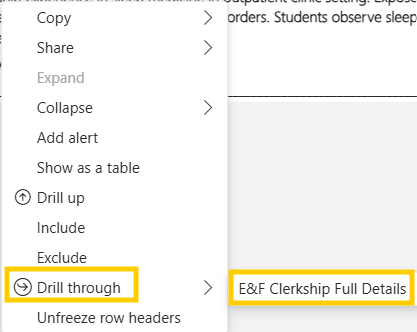
- Right click on the course
- Select “Drill Through”
- Select “E&F Clerkship Full Details”
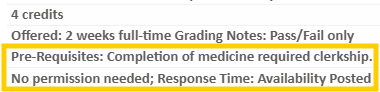
If the course is permission-only, contact the department clerkship administrator for approval. If approval is granted, attach permission email as a PDF to your Add request in the Manage Schedule Request tool.
To view availability in eValue, review our user guide (specifically page 2).
Tips:
Choose the right Curriculum for the timeframe you need:
- Explore and Focus Curriculum 2025-26 shows ONLY courses offered Spring 2026.
- Explore and Focus Curriculum 2026-27 shows ONLY courses offered Summer 2026, Autumn 2026, and Winter 2027.
6-week deadlines: Requests to drop/add a course must arrive by 12pm (noon) Pacific time on the Friday that is 6 weeks before a course is scheduled to start. Review the 2026-2027 Six Week Deadline Cheat Sheet.
Late Drops/Adds: You may be able to drop/add an elective within the 6-week deadline, but you will need department clerkship administrator permission.
What should I do with my time off during Patient Care Phase?
Most students in the Patient Care Phase will have a period of six weeks in which they will not have a required clerkship scheduled. This timeframe is for your personal use. You have many options: Personal activities, family time, wellness, research, community service, career exploration, taking an elective, or a combination of these.
Is taking an elective a good choice for you? What should you do during your elective block? Review the Career Advising Elective Selection website. When in doubt, ask your Career Advisor! You can schedule with them or meet for office hours.
I might be interested in taking an elective. What should I consider when choosing one?
- Its grading options. Four-week clinical electives are graded Honors/High Pass/Pass/ Fail. You typically want to avoid these early in your clinical training – no need for an average grade in a course that could be important to your residency application when you might get a higher grade by waiting until you have more experience. Two-week clinical electives are graded Pass/Fail, so if you decide to take an elective, this is a better option.
- Your specialty considerations. If you’re interested in a specialty that goes beyond the core clerkships, you might consider a two-week Pass/Fail elective. Again, we don’t recommend scheduling a four-week graded elective during this timeframe for the reason above.
- Course prerequisites. Check the course description carefully in the Explore & Focus Catalog as prerequisites vary and may include:
- Completion of all Patient Care Phase clerkships
- Completion of a specific clerkship(s)
- Permission from department clerkship administrator
- Acceptance to and participation in an SOM Pathway program
- No prerequisites
What are the steps to find and Add electives to my schedule?
- Check for available courses in the Availability Schedule report in eValue.
- Review course permission status and pre-requisites in the Explore & Focus Catalog.
- Submit your Add in the Manage Schedule Request tool in eValue.
SOM Registration makes the change if possible. An automatic email is sent through eValue once your request is processed.
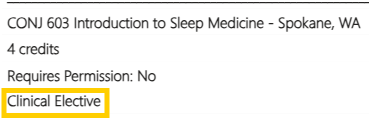
How do I know if a course is an Elective?
Course designations are viewable in the Explore & Focus Catalog:
Can I add whatever Elective I want?
This depends on the course pre-requisites, permission status, and availability.
To view the course pre-requisites and permission status in the Explore & Focus Catalog:
- Right click on the course
- Select “Drill Through”
- Select “E&F Clerkship Full Details”
To view availability in eValue, review our Manage Schedule Request User Guide (specifically page 2).
How do I submit my Add request?
You will use the Manage Schedule Requests tool in eValue to request elective adds.
Please keep in mind that the Manage Schedule Request tool is an Add/Drop tool, not a preferencing tool. We ask that students refrain from submitting multiple Add requests for the same timeframe, as it does not appear clear to the Registration & Records staff which course you want more over the other.
Please review our user guides and webinar below:
Manage Schedule Request Tool Webinar
Student Instructions eValue Manage Schedule Requests
Step by Step Schedule Change Student Instructions
What is the deadline for elective scheduling?
You are able to add/drop electives during the entirety of your third year. Keep in mind that there are 6 week deadlines for all courses.
Drops or adds 6 weeks or less before the official start date of an elective requires permission from the department clerkship contact. Your schedule change request (add/drop) must be received via the Manage Schedule Request tool by Friday at noon before the 6 week mark. Please review the 2025-2026 Six Week Add Drop Cheat Sheet and 2026-2027 Six Week Deadline Cheat Sheet.
How do I show I have approval to add a permission-only course or late-add a course?
After you have received approval from the clerkship administrator, download your permission email as a PDF and attach to your add request in the Manage Schedule Request tool.
How do I show I have approval to late-drop a course?
After you have received approval from the clerkship administrator, forward your approval email to somreg@uw.edu.
Will SOM Registration honor the elective requests I submit?
Some, but not all, of the reasons we can’t fulfill your request include:
- The course you requested to add is full. We make course changes manually, and because courses at this point are first-come, first-served it’s possible that a course you thought had availability when you made your request has been requested by another student first.
- You submitted an Add request for a permission-only course, but did not attach your permission email as a PDF to your request. You’ll need to email the departmental clerkship administrator and attach permission to your Add request in eValue.
- You have requested a drop or add 6 weeks or less before the official start date of a course but do not have permission from the clerkship administrator to do that.
- You are asking to add a course that conflicts with another course on your schedule. Note that your request in this case will need to be both a drop and an add.
- You do not have the prerequisites for the course.
I forgot to submit my request, but I emailed/called/spoke with someone from the department/a Dean/another staff member. That works too right?
No. Only SOM Registration can make course changes in eValue.
If a course is on your eValue schedule, you’re enrolled in it; if a course is not on your eValue schedule, you’re not enrolled in it. Only SOM Registration has access to the part of the eValue system that makes changes.