
Frequently Asked Questions
Phase 1: Permission-Only FAQs
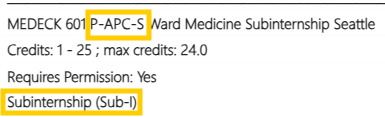
How do I know if a course is an Elective, APC, or SUBI?
Courses are either Electives, APCs, or SUBIs:
P = Elective
P-APC = APC
P-APC-S = SUBI
You can view the course designation in the Explore & Focus Catalog:
Can I add permission-only courses after the permission-only scheduling deadline?
Once the deadline has passed, we are no longer able to add permission-only courses. However, you may continue to request permission for permission-only electives past Phase 1. The next opportunity to add them would be during Open Scheduling. During Open Scheduling, you can add permission-only courses and submit requests to add/drop.
What if the clerkship department can’t provide approval for the permission-only course I want by the end of Phase 1?
Some departments may not have all permission-only site availability confirmed by the end of Phase 1. Do not stress. If you receive your desired permission after Phase 1 ends, it can easily be added during Open Scheduling.
What is the difference between an APC and an APC-S?
An APC is an Advanced Patient Care clerkship. An APC-S is a Sub-internship aka SUBI. Read more about the differences on Curriculum’s website on Advanced Patient Care clerkships.
Can I add two APCs in lieu of an APC-S (SUBI) during Phase 1?
Having both one APC and one APC-S (SUBI) is a graduation requirement. Since there is a limited amount of each, only one APC and only one SUBI can be scheduled during Phase 1 and Phase 2. Once everyone in the cohort has one APC and one SUBI on their schedule upon the completion of Phase 2, additional APCs and SUBIs can be added during Phase 3: Open Scheduling.
What if I miss the deadline for Phase 1?
If your permission-only clerkship was not added during Phase 1, you will easily be able to add during Phase 3 (Open Scheduling).
Do I need all my permission approvals for graduation requirements before the Phase 1 deadline?
The purpose of Phase 1 is to allow students to schedule permission-only courses prior to Phase 2 (EVOS Preferencing). You do not need all of the permission approvals for graduation requirements before the Phase 1 deadline. Most students will receive the largest amount of permission-only approvals during Phase 3 (Open Scheduling). You will continue to request permission for permission-only courses throughout Open Scheduling.
Keep in mind that fourth year is extremely fluid. Much of your schedule will change due to your own decision making. Open Scheduling is open to you the entirety of your fourth year.
Phase 2: EVOS Preferencing FAQs
How do I log in to EVOS?
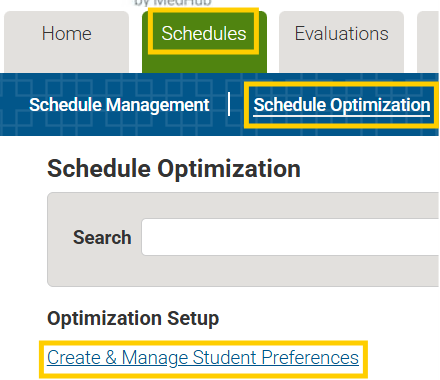
See the EVOS User Guide. Login to eValue. Select Schedules>Schedule Optimization>Create & Manage Student Preferences
What is the result of EVOS Preferencing?
EVOS will honor permission-only courses that have been scheduled for you. EVOS will ensure you are scheduled for the four required rotations:
- Required Emergency Medicine*
- Required Neurology/Neurosurgery
- Advanced Patient Care (APC)*
- Sub-Internship (SUBI)*
*If you received one of these courses from Phase 1 (permission-only scheduling), you will not receive this course during EVOS preferencing.
EVOS will only schedule you for the below, if you made preferences for them:
- Electives
- Step 2 Time Off
- E&F Time Off
Will EVOS assign me a course even if I don’t preference it?
Keep in mind that EVOS will ensure all students have Emergency Medicine, Neurology/Neurosurgery, a Sub-internship, and an Advanced Patient Care clerkship. Preferences are not required to assign the previously mentioned four core clerkships. However, the usual result of not entering preferences is that the “left overs” are assigned to students who have not provided preferences. It is a good idea to provide the optimizer with enough options so that alternatives can be found. Another way to look at this concept is to remember that it is far less likely to assign something that you truly do not want if there are enough acceptable alternatives provided.
How do I preference the required Emergency Medicine or Neurology clerkship?
To preference the required Emergency Medicine clerkship: Look for MED EM – Emergency Medicine – Optimized in the course list, then make your selection for timeframe, zone, and/or site.
To preference the required Neurology clerkship: Look for NEURL – Neurology – Optimized in the course list, then make your selection for timeframe, zone, and/or site.
Interested in Neurosurgery? Neurosurgery clerkships that fulfill the Neurology requirement are not included in the NEURL – Neurology – Optimized course list. Make sure to preference the specific Neurosurgery course.
Do I need all my graduation requirements as a result of Phase 2?
No. EVOS will ensure you are scheduled for the four required rotations: Required Emergency Medicine*, Required Neurology/Neurosurgery, Advanced Patient Care (APC)*, Sub-Internship (SUBI).*
*If you received one of these courses from Phase 1 (permission-only scheduling), you will not receive this course during EVOS preferencing.
Electives will only be scheduled if you made preferences for them. You can utilize Open Scheduling to add any additional electives to meet the 40 credits required.
Can I preference a second APC-S (SUBI) in lieu of an APC?
Only one APC and only one APC-S (SUBI) can be scheduled during Phase 1 and 2. Additional APCs and APC-S’s (SUBIs) can be added during Open Scheduling.
We do not recommend preferencing an APC if you already have one from Phase 1. We do not recommend preferencing an APC-S (SUBI) if you already have one from Phase 1. EVOS will not assign a second APC or second APC-S (SUBI).
What if there are permission-only courses not yet on my schedule?
If your permission-only course is not added before Phase 2 begins, avoid preferencing timeframes that are during permission-only courses that are not yet on your schedule. Or, consider using “EF Time Off” (see more below) during the timeframe your not yet scheduled permission-only course resides. In the event you are scheduled for a course during a not yet scheduled permission-only course, utilize Open Scheduling to move around clerkships.
How do I save space on my schedule for away electives?
Preference electives during the general timeframes you anticipate visiting electives to be available to you. It is much easier to drop a UW elective in order to add an away elective than to have to scramble to add an elective at UW because a visiting institution didn’t offer you a spot or didn’t offer you a spot at the time you requested.
How do I get electives on my schedule?
EVOS will schedule you for a maximum of 20 weeks of electives if you make preferences for electives. Because EVOS does not know your specialty interest(s) it will not schedule you into electives unless you preference those.
Can I preference time off?
EVOS will schedule you for a maximum of two, 4-week time off periods if you preference them.
There are two different options for time off in the E&F phase:
- EF Time Off: Use this to preference a 4-week block of time for residency interviews or for personal reasons
- Step 2 Prep Time Off: Use this to preference a 4-week block of time for Step 2 study during Spring A, B, C or Summer A, B
Remember that preferencing doesn’t guarantee these time periods off, but they won’t be assigned unless you preference them.
Need more time off? Utilize Open Scheduling to drop courses to allow for the additional time off.
I would like to schedule 8 weeks of Step 2 Prep Time Off. How do I enter this into my preferences?
Step 2 Study Time and EF Time Off are only four-week blocks each and EVOS will only schedule you for one of each. Once Open Scheduling begins, you can rearrange your schedule by dropping courses to allow for additional time off.
Are there specific timeframes I can preference Step 2 Prep Time Off and EF Time Off?
EF Time Off is available to be preferenced throughout the 2026-2027 (Spring 2026 through Spring 2027) clinical year. Step 2 Prep Time Off is only available to be preferenced during Spring A, Spring B, Spring C, Summer A, or Summer B.
If you need additional time for Step 2 study, utilize Open Scheduling to drop or move clerkships.
What if I already have permission-only courses on my schedule?
EVOS will honor permission-only courses that have been scheduled for you. For example, if you already have Emergency Medicine scheduled for Spring C, that blocks EVOS from placing another course there and from giving you a second EM course.
Note that if you already have a permission-only APC on your schedule EVOS will not give you a second APC. If you already have a Sub-I on your schedule EVOS will not give you a second Sub-I.
I’m an E&F Track student. Do I do anything differently?
A few things to consider: Remember that you will be assigned Emergency Medicine (EM), Neurology/Neurosurgery (NEURL/NEUR S), and a third course at sites in your Track. Consequently, don’t select an EM or NEURL/NEUR S course that’s not at your Track site – that’s a wasted preference. If you have an APC or SUBI in your Track site that has already been scheduled then great – you already have your third course. If you don’t have an APC or SUBI in your Track site that’s already scheduled make sure some of your preferences include courses (APC, SUBI, or electives) that are located in your Track.
What happens in preferencing?
During preferencing, you may select up to 20 preferences for courses, time frames, and/or sites for E&F clerkships. Preference #1 should be what is most important to you, preference #2 what is next in importance, etc. You don’t have to use all 20 preferences, but the more you enter the more EVOS has to work with.
How do I prepare to enter preferences?
Think about your priorities: Is it the timeframe of a specific clerkship? A specific site? A time period to be off for Step 2 study, residency interviews, or personal or family reasons? Use the Specialty Guides to see what courses different specialties recommend.
Why can’t I find the course I want to preference in EVOS?
EVOS only contains courses that do not require permission, since the system cannot check to see if you have received department approval. Make sure to check the permission status of the course you want to preference in the Explore & Focus Catalog.
If the course does not require permission and is not listed in EVOS, it is likely that the course is full for the specified timeframe, or the course is not offered during the academic year. To check course availability, login to eValue. Select “Reports” > “Availability Schedule.”
Is there a good strategy for preferencing?
- Don’t repeat a preference. If EVOS can’t give this course to you as your higher preference then it can’t give it to you at any preference, so duplicate preferencing is tantamount to wasting a preference.
- Selecting “any timeframe” as opposed to a specific timeframe gives EVOS more opportunities to give you a course. There may be instances where timing is important, but if not then “any timeframe” increases your chances of being scheduled into that course.
- Work specific to general. Your higher preferences can certainly be very specific, but as you go further down the list consider more general options.
What if I miss the deadline to enter preferences or don’t make preferences?
EVOS will assign you four E&F courses (required Emergency Medicine*, required Neurology/Neurosurgery, an APC*, and a SUBI*) even if you miss the deadline or choose not to enter any preferences. Note that we can’t stop and reopen preferencing for you if you miss the deadline. Once preferencing closes, EVOS starts its run.
You will be able to change your EVOS schedule and add electives during Phase 3: Open Scheduling in January.
*If you already have an APC or SUBI on your schedule from permission-only scheduling, you will not receive a second APC or SUBI during EVOS preferencing.
What comes after EVOS?
Once schedules are posted, you’ll have an opportunity to add and drop throughout Phase 3: Open Scheduling. When exactly this begins depends on when schedules come out, so we’ll let you know as soon as possible.
Open Scheduling remains open throughout your entire E&F year and depends on availability (i.e., no swap/trade).
Phase 3: Open Scheduling FAQs
What is Open Scheduling?
When E&F scheduling through the EVOS optimizer ends, you can adjust your E&F schedule by adding or dropping courses. This process is called Open Scheduling.
Requests are processed on a first come, first served basis.
How does Open Scheduling work?
- Check for available courses in the Availability Schedule report in eValue.
- Review course permission status and pre-requisites in the Explore & Focus Catalog.
- Submit your add/drop in the Manage Schedule Request tool in eValue.
SOM Registration makes the change if possible. An automatic email is sent through eValue once your request is processed.
How do I submit my schedule change request?
You will use the Manage Schedule Requests tool in eValue to request schedule changes.
Please keep in mind that the Manage Schedule Request tool is an Add/Drop tool, not a preferencing tool. We ask that students refrain from submitting multiple Add requests for the same timeframe, as it does not appear clear to the Registration & Records staff which course you want more over the other.
Please review our user guides and webinar below:
Manage Schedule Request Tool Webinar
Student Instructions eValue Manage Schedule Requests
Step by Step Schedule Change Student Instructions
What is the deadline for Open Scheduling?
You are able to make schedule changes during the entirety of your fourth year. Keep in mind that there are 6 week deadlines for all courses.
Drops or adds 6 weeks or less before the official start date of an E&F course require permission from the department clerkship contact. Your schedule change request (add/drop) must be received via the Manage Schedule Request tool by Friday at noon before the 6 week mark. Please review the 2025-2026 Six Week Add Drop Cheat Sheet / 2026-2027 Six Week Deadline Cheat Sheet
Can I register/add/drop E&F courses myself through MyUW?
Students no longer need to register themselves in their MyUW account in the clinical phase. Our team registers clinical students under CONJ 699A (the clinical placeholder).
Will SOM Registration honor changes I request?
If we can. Some, but not all, of the reasons we can’t fulfill your request include:
- The course you requested to add is full. We have to make course changes manually, and because courses are first-come, first-served it’s possible that a course you thought had availability when you made your request may have already been in our queue to add for someone else.
- Your Add request is for a permission-only course, but you did not attach the permission email as a PDF to your request. Permission-only courses don’t go away when the permission-only scheduling period ends, so the same process applies as then – email the departmental clerkship administrator and attach their approval email as a PDF to your Add request in eValue.
- You have requested a drop or add 6 weeks or less before the official start date of a course but have not sent us permission from the department clerkship contact to do that.
- You are asking to add a course that conflicts with another course on your schedule. Note that your request in this case will need to be both a drop and an add.
- You have an expected graduation date of June 2026 but are requesting to add a course that starts after May 08, 2026. All course requirements to graduate except Transition to Residency must be completed by this date.
How do I see what courses are available?
Review pages 1 and 2 on the eValue Manage Schedule Requests User Guide.
Tips:
- Choose the right Curriculum for the timeframe you need:
- E&F Curriculum 2025-26 will give you ONLY courses offered Spring 2026
- E&F Curriculum 2026-27 will give you ONLY courses offered Summer 2026, Autumn 2026, Winter 2027 and Spring 2027
- Use Required Course Group to narrow your search. “EF Clinical Electives” will result in just electives; “Clinical Electives” includes APCs and Sub-Is.
I want to take away rotations. How do I schedule those?
After you have formally been accepted to an away rotation and have completed the steps for Special Assignment Elective approval, you can then submit an Add request in the Manage Schedule Request tool to add your away rotation and make any other changes to your schedule to accommodate the away rotation if necessary.
How do I know if I have scheduled everything I need to graduate?
Review your Graduation Audit Report (GAR) and your entry year Graduation Requirements.
Do permission-only clerkships continue to require permission?
Yes, courses that required permission during Phase 1 will continue to require permission. Make sure to review the Explore & Focus Catalog to view permission status and course details.
How can I see what courses on my schedule are fulfilling graduation requirements?
You can track your degree progress by regularly reviewing your Clerkship Graduation Audit.
Can I add additional APCs (P-APC) and SUBIs (P-APC-S) during Open Scheduling?
Yes. Now that all students have one of each on their schedule from Phase 1 and Phase 2, you are able to add additional APCs and SUBIs.
Can I add/drop a course that begins in less than 6 weeks?
There is a 6-week add/drop policy. Review the Clinical Elective Clerkships Add/Drop Policies (last paragraph). E&F Clerkships may be added/dropped up until noon PST the Friday preceding the six-week start date of a rotation.
Courses that begin in less than 6 weeks will need permission from the Clerkship Administrator to add/drop. Review the 2026-2027 Six Week Deadline Cheat Sheet.